



ServiceNow is not just an IT ticketing tool. That’s the biggest misconception people have when they first hear about it, and I will be honest, that’s exactly what I thought it was when I first came across it.
“Oh, another help desk system or something like CRM,” but I was wrong. Yes, IT teams use it for incident management. But it’s a full enterprise platform. e.g., HR workflows, customer service operations, security operations, governance and risk, and completely custom business apps that have nothing to do with IT.
Think of it as a giant workflow engine that connects people, systems, and data across an entire organization. Once I started seeing how companies actually use it, I realized this platform is far bigger than I gave it credit for. And that’s exactly what makes it worth learning.
This is the first post in an 18-part series, and we’re going to cover all the fundamentals: what ServiceNow actually does, when you should (and shouldn’t) use it, the four developer personas, low-code vs no-code, how instances work, Shadow IT, the four UI experiences in Zurich 2026, and how to get your hands dirty with a first project.
If you’ve never touched ServiceNow before, you’re in the right place. No prior knowledge is needed. A basic understanding of how web apps work helps, but it’s not required.
What Does ServiceNow Actually Do?
At its core, ServiceNow is a cloud-based platform that helps organizations digitize and automate their business processes.
Every organization has processes. Approving purchase orders. Onboarding new employees. Resolving IT issues. Managing change requests. Tracking assets. A lot of these start on paper, move to spreadsheets, and eventually need a real system. ServiceNow is that system, and it gives you an enormous head start over building something from scratch.
Here’s what makes it interesting: the platform runs on a single data model, codebase, and architecture. Every application built on ServiceNow shares the same underlying framework, the same security model, the same notification engine, the same reporting, and the same integration capabilities. That’s a big deal compared to stitching together five different SaaS tools and hoping they play nice together.
Good Fit Assessment: When ServiceNow Is the Right Tool
So, when should you actually use ServiceNow? And when should you look elsewhere?
What ServiceNow Is Designed For (Good Fit)
| Capability | What It Means | Practical Example |
|---|---|---|
| Multi-step workflow management | Route tasks through approval chains, escalations, and handoffs automatically | An employee submits a laptop request. It goes to their manager for approval, then to IT for fulfillment, then triggers asset tracking. Each step is automated. |
| Forms to collect and display data | Build structured data entry screens without writing HTML, CSS, or JavaScript | A facilities team needs a form for office space requests. ServiceNow provides form builders that generate the UI, validation, and data storage automatically. |
| Approvals, escalations, audit trails | Built-in governance and compliance tracking at every level | A change request requires approval from the Change Advisory Board. If no one responds within 48 hours, it escalates to the VP of Engineering. Every action is logged with timestamps. |
| Notifications and events | Automated email, SMS, and push notifications triggered by business events | When a critical incident is created, ServiceNow sends an email to the on-call team, posts to Slack, and pages the incident manager — all automatically, no custom code needed. |
| Reporting and dashboards | Real-time analytics, visual reporting, and performance analytics | A service desk manager needs a dashboard showing open tickets by priority, average resolution time, and SLA compliance. ServiceNow generates this from the same data the agents work with. |
| Integration with other systems | Connect to hundreds of external services via REST, SOAP, and pre-built connectors | Your HR system lives in Workday, your project management is in Jira, and your communication is in Slack. ServiceNow can connect to all three and orchestrate processes across them. |
What ServiceNow Is NOT Designed For (Poor Fit)
This part matters just as much. I’ve seen teams burn through months of effort trying to force ServiceNow into use cases it was never designed for. Picking the wrong platform wastes time and budget.
| Poor Fit | Why It Doesn’t Work | What to Use Instead |
|---|---|---|
| Requires as-is low-level programming libraries | ServiceNow abstracts away infrastructure. You can’t import arbitrary npm packages, use system-level APIs, or link custom C/C++ libraries. The platform controls its own runtime. | A standalone app built in Node.js, Python, or Java on your own infrastructure. |
| Real-time video/audio processing | Not built for media streaming, real-time communication, or live video. No WebRTC, no media server, no real-time audio pipeline. | Twilio, Zoom SDK, AWS Chime, or a custom WebRTC app. |
| Standalone consumer mobile game | No game engine, no GPU access, no real-time rendering. ServiceNow mobile is for enterprise workflows, not interactive entertainment. | Unity, Unreal Engine, or native iOS/Android development. |
| Full control over the database engine | ServiceNow manages its own database (multi-tenant architecture). You can’t tune indexes, write raw SQL, choose a different engine, or control replication. | PostgreSQL, MySQL, or a cloud database like AWS RDS, where you manage the schema. |
| Compute-intensive scientific simulation | No access to HPC resources, no GPU clusters, no parallel processing frameworks. | AWS HPC, Google Cloud HPC, or on-premises clusters with MPI/CUDA. |
EXAM TRAP: “Requires as-is use of low-level programming libraries” is the exam’s specific phrasing for a poor fit. All other options (workflow, forms, reporting, approvals, notifications) ARE good fits. If you see this exact phrase in an exam question, it’s always the “not a good fit” answer.
The Rule of Thumb
If your solution involves workflows, forms, approvals, and notifications, ServiceNow is an excellent fit. If it requires low-level hardware access, real-time media, or raw compute power, look elsewhere.
Sounds simple, right? But exam questions love to mix good-fit and poor-fit items in the same list. Always look for the low-level programming library option that’s the one that doesn’t belong.
The Business Process Design Plan: 4 Things to Document
Before you build anything on ServiceNow, you need to document the business process design plan. This isn’t optional; it’s the foundation of every successful ServiceNow project, and it shows up on the CAD exam. I’ll be honest, when I started, I wanted to skip straight to building. That was a bad idea. The projects where I skipped this step always came back to haunt me.
Four things to document:
1. Business Problem
What pain point are you solving? Why does this project exist?
This isn’t a technical description. It’s a business description. You need to articulate the problem in terms a non-technical stakeholder can understand and agree with.
Example: “The facilities team currently receives office supply requests via email. Requests get lost, there’s no tracking, no approval workflow, and no way to report on spending. The team spends 4 hours per week manually tracking requests in a spreadsheet.”
Bad example: “We need a form with 12 fields and a Flow Designer trigger.” That’s a solution, not a problem statement.
2. Data Input/Output
What data comes into the system? What comes out? What needs to be stored?
Think about this from the user’s perspective.
Example:
- Input: Requester name, department, item requested, quantity, justification, cost center
- Output: Request status, approval status, estimated delivery date, tracking number
- Stored: All of the above, plus timestamps, approver comments, fulfillment notes, and audit trail
3. Users and Stakeholders
Who uses the application? Who approves? Who manages it? Who’s affected by it?
Don’t just list names. Understand the roles.
Example:
- Requester: Any employee who needs office supplies
- Approver: The requester’s direct manager (auto-assigned based on org chart)
- Fulfillment team: The facilities department (3 people who process orders)
- Executive sponsor: VP of Operations (needs monthly spending reports)
- Platform admin: ServiceNow admin who maintains the application
4. Process Steps
What’s the workflow from start to finish? What happens at each step? Where are the decision points?
Example:
- Employee opens the catalog item and fills out the request form.
- Form validates required fields and submits.
- The manager receives an approval notification via email.
- Manager approves or rejects
- If approved, a task is created for the facilities team.
- The facilities team fulfills the request and marks it complete.
- The requester receives a notification that their request is fulfilled.
- If rejected, the requester receives a notification with the rejection reason.
EXAM TIP: These four items (Business problem, Data input/output, Users and stakeholders, Process steps) are the official answer when the exam asks “What should you document before building an application on ServiceNow?”
The 4 Official Developer Personas
ServiceNow defines four types of developers. These are not job titles; they describe how someone builds on the platform and what tools they use.
A single person might operate as different personas depending on the task, but the exam treats them as distinct categories. I remember being confused by this when I first saw it: “Wait, aren’t these just the same thing with different labels?” They’re not, and once you understand the distinctions, a lot of exam questions become straightforward.
1. Citizen Developer
| Attribute | Detail |
|---|---|
| Technical Level | Low-code / No-code |
| Focus | Automating specific business processes they know intimately |
| Primary Tools | Creator Studio, App Engine Studio (AES) |
| Background | Business analysts, team leads, process owners, HR managers, facilities coordinators |
| Coding Required | No. uses visual tools, drag-and-drop builders, and templates |
a. What Citizen Developers Do
These are business users who understand a process deeply because they live it every day. They use ServiceNow’s visual development tools to automate those processes without writing code. They don’t need to know JavaScript, GlideRecord, or server-side scripting.
b.What They Build
- Employee onboarding workflows
- Equipment request forms
- Approval processes for purchase orders
- Simple service catalog items
- Basic notification workflows
- Department-specific tracking applications
c. How They Build It
Two main tools:
- App Engine Studio (AES)
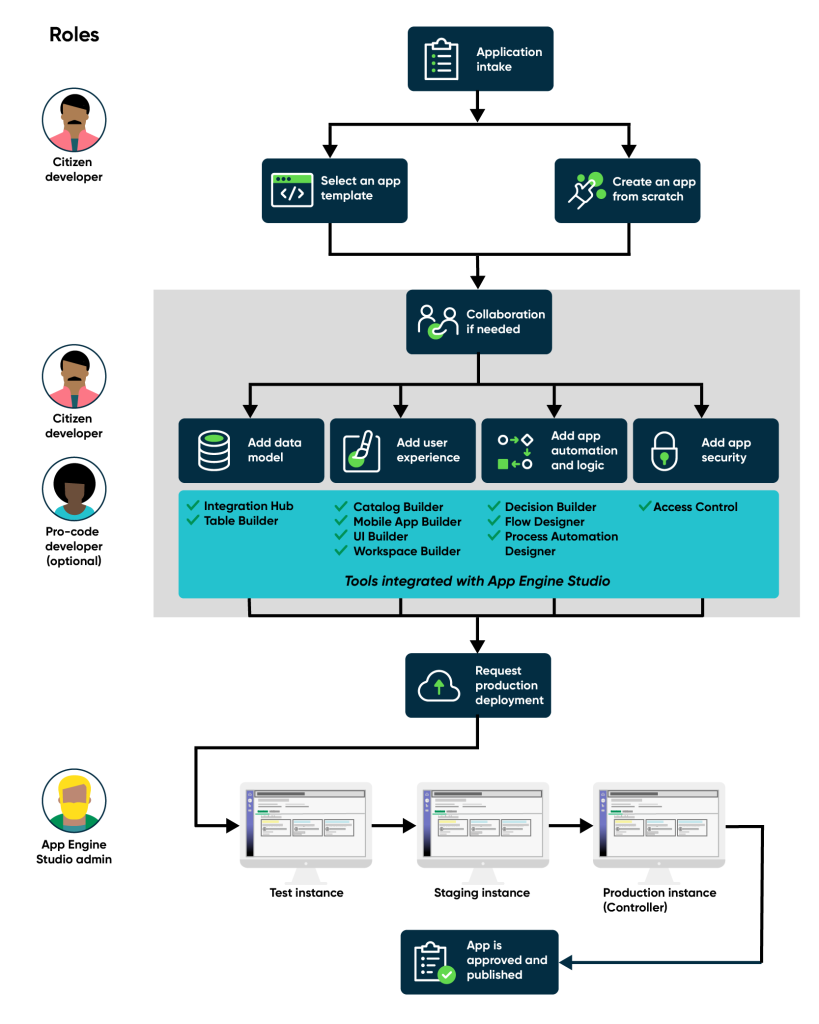
- The primary low-code environment with visual builders for tables, forms, flows, and security
- Creator Studio:
- A no-code tool for simple request-and-fulfill applications (note: Creator Studio is technically for process owners, but citizen developers are the primary AES users)
They work within the 4 Pillars of AES:
- Data (Table Builder, Integration Hub),
- Experience (UI Builder, Catalog Builder, Mobile App Builder, Workspace Builder),
- Logic (Flow Designer, Decision Builder, Playbooks),
- Security (ACLs and Roles).
d. Governance and Oversight
Citizen developers don’t operate in a vacuum. Their work is governed by AEMC (App Engine Management Center), which gives platform admins oversight of all citizen-developed applications, app intake review, deployment pipeline management, and health monitoring.
e. What Citizen Developers CANNOT Do
| Cannot do | Why |
|---|---|
| Write Business Rules with JavaScript | AES doesn’t expose a script editor for BRs |
| Create Script Includes | Requires pro-code environment (Studio) |
| Write Client Scripts | Requires JavaScript knowledge and Studio |
| Use ServiceNow IDE | IDE is exclusively for Source Code Developers |
| Manage platform-level security | That’s the Platform Developer’s job |
| Configure complex ACL scripts | AES only supports checkbox-based ACLs |
f. When to Escalate
If a citizen developer’s requirements exceed what AES can handle, they can request a pro-code collaborator, a Pro Developer who joins their AES project to write the complex scripts, Business Rules, or integrations that visual tools can’t provide.
2. Pro Developer
| Attribute | Detail |
|---|---|
| Technical Level | High-code (JavaScript) |
| Focus | Complex business logic, custom UI components, integrations |
| Primary Tools | ServiceNow Studio, JavaScript |
| Background | Software developers, full-stack engineers, JavaScript developers |
| Coding Required | Yes — writes server-side and client-side JavaScript |
a. What Pro Developers Do
Pro developers are professional software developers who write code on the ServiceNow platform. They understand JavaScript deeply, know the ServiceNow API (GlideRecord, GlideSystem, GlideAjax), and can build complex applications that need custom logic beyond what visual tools can offer.
b. What They Build
- Complex Business Rules with conditional logic and GlideRecord queries
- Client Scripts that validate form data and control UI behavior
- Script Includes with reusable server-side functions
- Custom REST integrations with external systems
- Advanced Flow Designer actions with custom scripts
- UI components using UI Builder and custom web components
- Complex ACL rules with scripted conditions
c. How They Build It
Pro developers primarily use ServiceNow Studio, the unified development environment with a full JavaScript editor, file navigator, syntax highlighting, auto-complete, and debugging tools. They can also use the Experience Switcher to jump between Studio, AES, and Creator Studio depending on the task.
d. Collaboration with Citizen Developers
Pro developers are often called in as collaborators on AES projects. When a citizen developer builds an app in AES but hits a wall, they need a complex Business Rule, a custom integration, or an advanced security model; they request a pro-code collaborator. The Pro Developer joins the AES project, writes the necessary code, and hands it back.
e. Key Skills
- JavaScript (server-side and client-side)
- GlideRecord API for database operations
- GlideSystem API for system-level operations
- GlideAjax for client-to-server communication
- REST API integration (consumer and provider)
- Business Rule design patterns
- Client Script types (onLoad, onChange, onSubmit, onCellEdit)
- Script Include patterns (classless, class-based, GlideAjax-callable)
3. Platform Developer
| Attribute | Detail |
|---|---|
| Technical Level | High-code + Administration |
| Focus | Platform health, security, upgrades, performance, governance |
| Primary Tools | Native UI, Application Portfolio Management |
| Background | System administrators, platform engineers, platform architects |
| Coding Required | Yes, but focused on platform configuration rather than application logic |
a. What Platform Developers Do
Platform developers don’t just build apps; they manage the platform itself. They’re responsible for the health, security, performance, and stability of the ServiceNow instance. Upgrade planning, security policies, performance tuning, governance across all applications, that’s their world.
b. Their Responsibilities
| Responsibility | What It Involves |
|---|---|
| Security governance | Configure ACLs, manage roles, enforce least-privilege access, and review cross-scope permissions |
| Platform health | Monitor instance performance, optimize slow queries, manage scheduled jobs, and review system logs |
| Upgrade planning | Test new releases in sub-production, review upgrade history, manage skipped records, and validate customizations |
| Application portfolio management | Track all installed applications, manage licenses, identify unused apps, and plan deprecation |
| Governance | Oversee AEMC, manage citizen developer permissions, and review app intake requests |
| Performance tuning | Identify and resolve slow Business Rules, optimize GlideRecord queries, and manage caching |
c. What They Build
Platform-level configurations rather than end-user applications:
- ACL rules and security policies
- System properties and configurations
- Performance monitoring dashboards
- Upgrade validation scripts
- Platform health check automations
- Cross-scope security configurations
d. Key Distinction from Pro Developer
This distinction gets tested a lot on the CAD exam:
| Aspect | Pro Developer | Platform Developer |
|---|---|---|
| Primary focus | Building applications on the platform | Managing the platform itself |
| What they create | Apps, Business Rules, Client Scripts, integrations | Security policies, upgrade plans, performance configs |
| Their “customer” | End users who use the applications | Developers and admins who use the platform |
| Security role | Uses security in their apps | Defines security for the entire instance |
| Example task | Write a Business Rule to auto-assign incidents | Configure ACLs to restrict table access across scopes |
EXAM TRAP: Pro Developer and Platform Developer are NOT the same. Pro Developer builds apps. Platform Developer manages the platform itself. A Pro Developer might never touch ACL configurations, while a Platform Developer might never write a custom UI component.
4. Source Code Developer
| Attribute | Detail |
|---|---|
| Technical Level | High-code with DevOps |
| Focus | Version control, CI/CD, TypeScript development |
| Primary Tools | ServiceNow IDE + SDK, Git, VS Code |
| Background | DevOps engineers, senior developers, full-stack engineers with DevOps experience |
| Coding Required | Yes — TypeScript (ServiceNow Fluent), JavaScript, Git |
a. What Source Code Developers Do
Source code developers work outside the browser, using VS Code and Git to build ServiceNow applications as code. They’re the most technical persona developers who prefer modern DevOps workflows, version control, code reviews, and CI/CD pipelines.
b. What They Build
- Full applications are defined as TypeScript source code using ServiceNow Fluent
- CI/CD pipelines for automated testing and deployment
- Custom integrations using third-party JavaScript/TypeScript libraries
- Applications managed entirely through Git version control
c. How They Build It
Two primary tools:
| Tool | What It Is | Access Method |
|---|---|---|
| ServiceNow IDE | VS Code for the Web, embedded in the ServiceNow platform, browser-based | Next Experience > Developer menu. No install needed. |
| ServiceNow SDK | VS Code Desktop runs locally on the developer’s machine | Download and install. Works offline. |
Both tools support ServiceNow Fluent, a TypeScript domain-specific language (DSL) for defining application metadata as source code. Instead of clicking through the browser UI to create tables, fields, and Business Rules, Source Code Developers define everything in TypeScript files.
d. Build Agent: AI-Powered Development
The Build Agent is ServiceNow’s AI coding assistant, available inside Studio and IDE. It can generate code, brainstorm architecture, write documentation, debug issues, and create application components through natural language conversation.
| Build Agent Capability | Example Prompt |
|---|---|
| Generate code | Write a Before Business Rule that validates priority |
| Brainstorm architecture | How should I structure an equipment request app? |
| Write documentation | Generate JSDoc comments for this Script Include |
| Debug issues | Why is this GlideRecord query returning no results? |
| Create components | Create a Client Script that makes the category mandatory when the priority is 1 |
EXAM TRAP:
Q: Can a Citizen Developer use ServiceNow IDE?
A: No. IDE is a pro-code tool for Source Code Developers only. If a citizen developer needs to build an app, they use Creator Studio or AES.
Q: What is the official name of the AI assistant in IDE/Studio?”
A: Build Agent. Not “Copilot” or “AI Assistant.”
Developer Persona Summary
| Attribute | Citizen Developer | Pro Developer | Platform Developer | Source Code Developer |
|---|---|---|---|---|
| Technical level | Low / No-code | High-code (JS) | High-code + Admin | High-code + DevOps |
| Primary focus | Business process automation | Complex app logic | Platform health + security | Version control + CI/CD |
| Main tools | Creator Studio, AES | Studio, JavaScript | Native UI, App Portfolio | IDE + SDK, Git |
| Writes JavaScript | No | Yes | Some | TypeScript (Fluent) |
| Manages security | Basic ACLs via builders | App-level ACLs | Platform-wide security | Code-defined security |
| Deploys via | AEMC pipeline | Update Sets, App Repo | Platform configs | Git, CI/CD, Release Ops |
| Background | Business analyst | Software developer | System administrator | DevOps engineer |
| In simple terms | Knows the process, no coding | Writes the code | Keeps the platform healthy | Codes locally with Git |
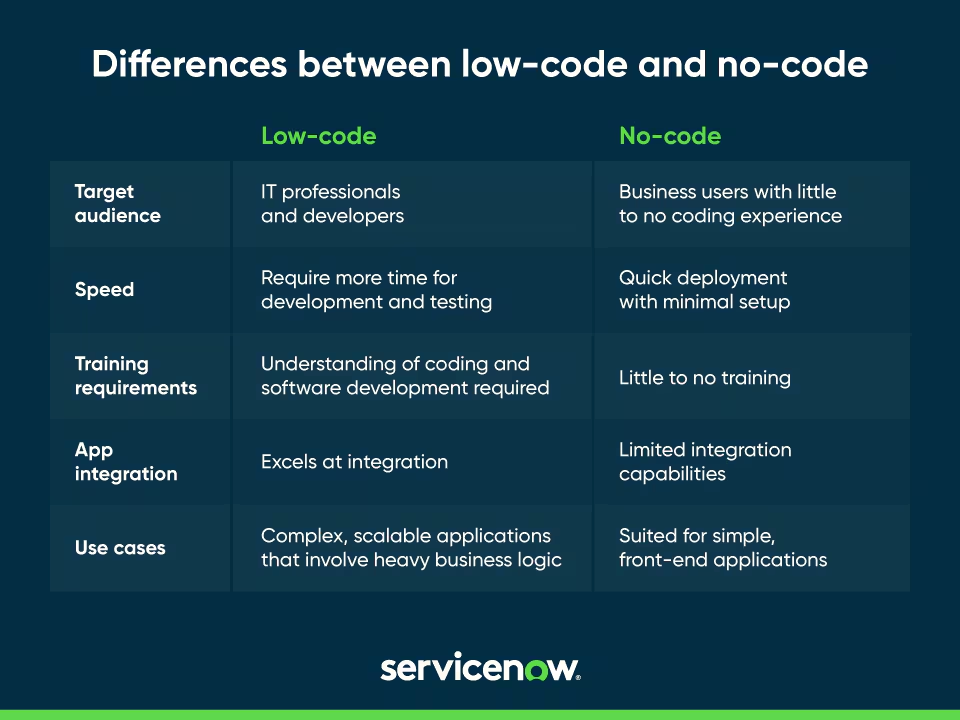
Low-Code vs No-Code: What’s the Actual Difference?
These terms get used all the time interchangeably, and I’ll admit I used to mix them up too. But they mean specific, different things in ServiceNow. And yes, the exam tests this.
No-Code Development
No-code means absolutely zero coding. The user interacts entirely through visual interfaces, drag-and-drop form builders, point-and-click flow designers, and configuration screens. There’s no script editor, no code tab, and no way to inject custom logic.
- Who it’s for:
- Citizen developers and business users who have no programming experience. They understand the business process but can’t write JavaScript.
- Example tool:
- Creator Studio builds request-and-fulfill applications with forms, approvals, and notifications. No scripting at all.
How it actually works:
- A process owner opens Creator Studio
- They describe their app in natural language (Zurich: “Build with Now Assist”)
- Creator Studio generates an initial form and workflow
- The process owner adjusts fields, approval steps, and notifications using visual tools
- They submit the app for deployment through AEMC
- At no point do they see a single line of code
Low-Code Development
Low-code means visual development is the primary method, but you CAN write code when you need to. The platform provides visual builders for 80% of common tasks, and a code editor for the remaining 20% that require custom logic.
- Who it’s for:
- Both professional developers AND non-technical business users.
- The visual tools make it accessible; the code editor gives developers the flexibility they need.
- Example tool:
- App Engine Studio (AES): build a broad range of applications using visual builders. When you need complex logic, you can request a pro-code collaborator to write scripts.
How it actually works:
- A citizen developer builds an app in AES using Table Builder, Flow Designer, and Catalog Builder
- They realize they need a complex validation that Flow Designer can’t handle
- They request a pro-code collaborator (a Pro Developer)
- The Pro Developer joins the AES project and writes the necessary Business Rule
- The citizen developer continues building the rest of the app visually
Side-by-Side Comparison
| Attribute | Low-Code | No-Code |
|---|---|---|
| Designed for | Professional developers AND non-technical business users | Citizen developers and business users ONLY |
| Coding required? | No — but you CAN write code when needed | No development experience required at all |
| Approach | Visual modeling + optional hand-coding | Visual only — zero coding |
| Script editor available? | Yes (via collaboration or Studio) | No — no script editor exists |
| Flexibility | High — can handle complex requirements | Limited — only what visual tools support |
| Learning curve | Low for visual tools, higher for scripts | Very low — anyone can start immediately |
| Risk | Controlled (IT can govern through AEMC) | Can lead to Shadow IT if ungoverned |
| Governance model | AEMC app intake + deployment pipeline | Should be governed but often isn’t |
| Example tools | App Engine Studio (AES), GAC | Creator Studio |
| Who builds | Citizen developers (primary), Pro developers (collaboration) | Process owners, LOB owners |
| Deployment | AEMC pipeline (Test > Staging > Production) | AEMC pipeline |
Why This Distinction Matters
The exam tests this directly. Here’s what to remember:
- Low-code is not the same as no-code. Low-code allows optional coding. No-code has zero coding.
- AES is low-code. Creator Studio is no-code.
- No-code can lead to Shadow IT. Because no-code tools are so easy to use, business users can build apps without IT knowing about them.
- Low-code risk is controlled because IT can govern low-code development through AEMC.
- Both approaches are valid. The right choice depends on the user, the requirements, and the governance model.
What Is Shadow IT and Why Governance Matters
The Shadow IT Problem
Shadow IT happens when business users build applications without IT oversight. This isn’t theoretical; it happens in every large organization, and I’ve personally seen the aftermath. Here’s a realistic scenario:
- The marketing team needs to track campaign performance
- They can’t wait 6 months for IT to build them an app
- A tech-savvy marketing manager builds an app using no-code tools
- The app works great for the marketing team
- But it doesn’t follow company security policies
- It’s not backed up
- It stores customer data without proper access controls
- It creates a data silo that other departments can’t access
- When the manager leaves, nobody knows how to maintain it
- The app breaks during a platform upgrade because it was never tested
That’s Shadow IT. The app solved a real business problem, but it created bigger problems around security, compliance, data governance, and maintainability.
Why ServiceNow Created AEMC
ServiceNow created AEMC (App Engine Management Center) specifically to solve this. It’s a governance layer that gives platform admins centralized oversight of all citizen-developed applications.
| AEMC Capability | What It Does | How It Prevents Shadow IT |
|---|---|---|
| App Intake | Review and approve/reject app ideas before development begins | Ensures every app has a business justification and IT oversight |
| Pipeline Management | Manage deployment: Test > Staging > Production (Controller) | Ensures apps are tested before reaching production |
| App Health Monitoring | Track app usage, performance, and compliance | Identifies poorly performing or abandoned apps |
| Governance Dashboard | Centralized oversight of ALL citizen-developed apps | Single pane of glass for IT to see everything |
The Key Insight
No-code tools make it easy for anyone to build apps. That’s both their strength and their risk. Without governance, no-code tools create Shadow IT. With governance (AEMC), they become powerful force multipliers; business users solve their own problems while IT maintains oversight and control.
EXAM TIP: If a question asks about the risk of no-code development, the answer is Shadow IT. If it asks how ServiceNow addresses that risk, the answer is AEMC.
The ServiceNow Instance: How Environments Work
What Is an Instance?
When you work with ServiceNow, you work on an instance, a dedicated environment with its own URL (like yourcompany.service-now.com). Each instance is a complete, isolated copy of the platform:
| Component | What It Means |
|---|---|
| Its own database | All data is stored in this instance’s database. Not shared with other instances. |
| Its own configuration | System properties, UI configurations, and customizations are instance-specific. |
| Its own users and roles | User accounts, roles, and permissions are managed per instance. |
| Its own installed applications | Applications can be installed or removed independently on each instance. |
| Its own URL | Every instance has a unique URL: instancename.service-now.com. |
The Multi-Instance Architecture
Most organizations run multiple instances to separate development from production. This isn’t optional; it’s a fundamental best practice. You should never develop directly in production.
| Instance | Purpose | Who Uses It | What Happens Here |
|---|---|---|---|
| Development (Dev) | Where developers build and test new features | Developers, citizen developers | Writing code, building flows, creating tables, testing changes in isolation |
| Test / QA | Where testers validate changes against requirements | QA team, business stakeholders | Functional testing, user acceptance testing, and regression testing |
| Staging / UAT | Final validation before production deployment | Pre-production team, final approvers | Performance testing, integration testing, and final sign-off |
| Production (Prod) | The live system that end users access every day | All end users, service agents | Real data, real users, real business impact |
How Changes Flow Between Instances
Changes move from Dev to Production using one of these methods:
| Method | Best For | Key Behavior |
|---|---|---|
| Update Sets | Global scope changes, small fixes | Manual. No automatic versioning. Can have collisions. Only captures additions and updates, NOT deletions. |
| App Repository | Scoped applications (best practice) | Automatic versioning. Cleaner than Update Sets. Handles deletions. |
| Release Ops (Zurich) | Automated CI/CD pipeline | Sits on TOP of App Repository. Enforces mandatory quality gates (ATF test passes) before production. |
The standard flow:
Development → Test → Staging → Production
For AEMC-governed citizen development (AES apps), the pipeline is:
Test Instance → Staging Instance → Production Instance (Controller)
EXAM TRAP: The official AEMC pipeline is NOT “DEV > TEST > UAT > PROD.” The correct stages are Test > Staging > Production (Controller). The production instance is specifically called the “Controller” in AEMC documentation.
Personal Developer Instances (PDIs)
ServiceNow offers free Personal Developer Instances for learning and experimentation. You can request one at developer.servicenow.com.
Here is a sample view of PDI.
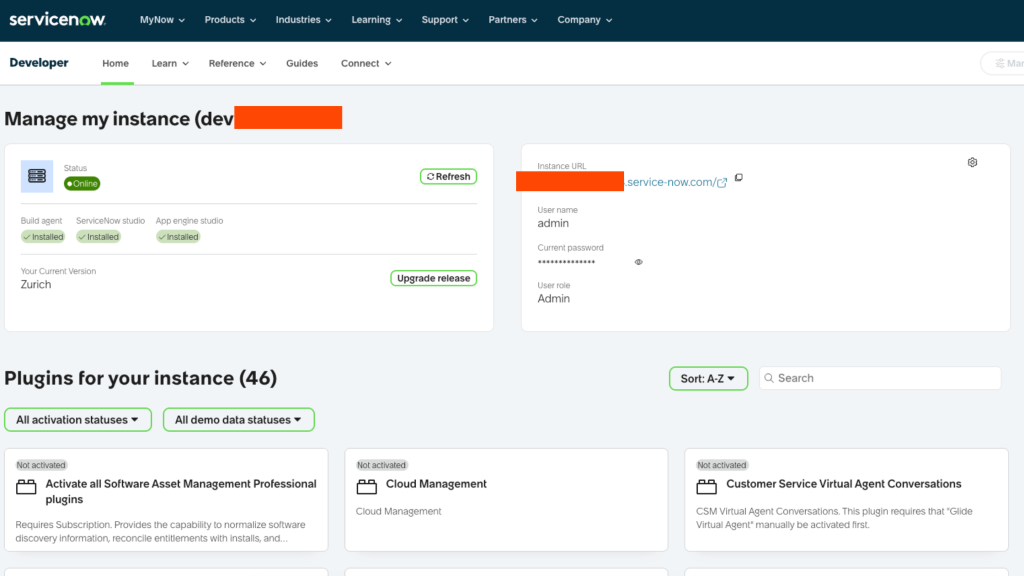
A PDI gives you:
- A fully functional ServiceNow instance
- Admin access to configure anything
- Pre-loaded demo data
- Automatic hibernation after 10 days of inactivity (wake it up by logging in)
- Periodic upgrades to the latest release
This is hands-down the best way to get hands-on experience without needing access to a company instance. My PDI has been my playground for years. I’ve broken things, fixed them, broken them again, and that’s how I actually learned the platform.
Developer Sandboxes (Zurich)
Zurich introduces Developer Sandboxes, personal isolated environments for parallel development. Unlike PDIs (which are for learning), Developer Sandboxes are production-adjacent environments that prevent code collisions when multiple developers work on the same instance simultaneously.
UI Experiences
ServiceNow’s user interface has evolved a lot over the years. In Zurich, there are four distinct UI experiences, each serving a different audience.
1. Next Experience UI — The Modern Unified Shell
| Attribute | Detail |
|---|---|
| What it is | The global unified navigation shell that wraps around everything in ServiceNow |
| Who uses it | Everyone, it’s the standard navigation framework |
| Key features | Unified navigation bar, Application Navigator, favorites, global search, notifications |
| Think of it as | The “operating system” chrome around your ServiceNow applications |
Next Experience UI isn’t a standalone application; it’s the navigation framework that gives you consistent access to all ServiceNow applications. It includes the unified navigation bar at the top, the Application Navigator on the left, the favorites and history system, global search, and the notification center.
Zurich Enhancements:
| Enhancement | What It Does |
|---|---|
| Now Assist Hub | Persistent AI sidebar is always available from the navigation bar. Ask questions, get summaries, and interact with AI without leaving your current context. |
| Theme Builder GenAI | Generate custom themes using natural language. Type “dark blue theme with rounded corners” and AI translates it into CSS variables. |
2. Configurable Workspace: Modern Agent Desktop
| Attribute | Detail |
|---|---|
| What it is | A modern, multi-tab agent desktop built using UI Builder |
| Who uses it | IT agents, customer service reps, HR agents, and anyone who works on tasks |
| Key features | Multi-tab layout, contextual side panels, split-screen views, real-time updates |
| Think of it as | A power user’s cockpit for processing work items efficiently |
Configurable Workspaces replace the old list-and-form approach with a multi-panel layout. Agents can open multiple records at once, see contextual information in side panels, and work through queues without constantly navigating back and forth.
Zurich Enhancements:
| Enhancement | What It Does |
|---|---|
| Agentic Workspace Layouts | The UI dynamically rearranges itself based on the AI Agent’s current task. If the AI Agent is resolving an incident, the workspace shows the relevant panels automatically. |
| AI summaries in headers | Every record header shows an AI-generated summary by default — no need to read the entire record to understand the context. |
3. Core UI: The Default Lists and Forms
| Attribute | Detail |
|---|---|
| What it is | The modern “lists and forms” interface — the baseline ServiceNow experience |
| Who uses it | All users on new instances — it’s the default |
| Key features | List views, form views, related lists, activity streams, tabs |
| Think of it as | The standard ServiceNow experience most people start with |
Core UI is what you see when you first log into a new ServiceNow instance. List views show records in a table, form views show a single record with all its fields. Most ServiceNow administration and basic development happens here.
Zurich Enhancement:
| Enhancement | What It Does |
|---|---|
| Predictive Form Fill | AI suggests field values based on patterns from previous records. Start typing, and AI auto-completes based on historical data. |
EXAM TRAP:
Core UI is the DEFAULT for new instances. This gets tested heavily. For upgraded instances (instances that existed before Core UI was introduced), an admin must activate it manually.
4. Classic Environment: Backend Developer Tools
| Attribute | Detail |
|---|---|
| What it is | The backend development environment, where developers and admins configure the platform |
| Who uses it | Developers and administrators. |
| Key features | Business Rules editor, ACL configuration, Script Include editor, System Properties |
| Think of it as | The “behind the scenes” area where the platform is configured |
This is where you go to write Business Rules, configure ACLs, edit Script Includes, manage System Properties, and handle other developer/admin tasks. It uses the traditional ServiceNow interface that’s been around for years.
UI Branding: Two Separate Systems
Another frequently tested concept. ServiceNow has two completely separate branding systems:
| Branding Target | How to Configure | Location |
|---|---|---|
| Classic UI (UI16) | System Properties > Basic Configuration UI16 | System Properties module |
| Next Experience UI | Theme Builder | Next Experience admin tools |
These are completely separate. Changing the Classic UI branding doesn’t affect the Next Experience branding, and vice versa. In Zurich, Theme Builder now includes GenAI to describe a theme in natural language, and AI generates it.
The Evolving UI Landscape
In Zurich, the distinction between Core UI and Classic Environment is fading. ServiceNow documentation increasingly refers to:
- Administrative UI
- for developers and administrators (replaces “Classic Environment”)
- Workspaces
- For agents and end users (includes Configurable Workspace)
Service Portal still exists for customer-facing portals, but Employee Center (built on Next Experience) is the recommended replacement for internal employee portals.
EXAM TRAP:
Zurich AI-UI features you must know: Now Assist Hub (persistent AI sidebar), Agentic Workspace Layouts (dynamic UI based on AI Agent task), Predictive Form Fill (AI field suggestions in Core UI), Theme Builder GenAI (natural language to CSS).
How to Get Started: Practical First Steps
New to ServiceNow? Here’s how I’d approach it.
Step 1: Get a Personal Developer Instance (PDI)
- Go to developer.servicenow.com
- Create a free account
- Request a PDI (Personal Developer Instance)
- Wait for it to be provisioned (usually 10-30 minutes)
- Log in with the admin credentials provided
Step 2: Explore Core UI
Once you’re in, spend some time just navigating around:
- Application Navigator: the left panel where you search for modules. Type “incident” to find the Incident module.
- Lists: click a module to see a list of records. Each row is a record.
- Forms: Click a record to see its form view with all fields.
- System Properties: navigate to System Properties > Basic Configuration to understand global settings.
Step 3: Figure Out Your Role
Which developer persona fits you?
- New to coding entirely?
- Start as a Citizen Developer. Open App Engine Studio and build a simple request form using visual tools.
- Have JavaScript experience?
- Start as a Pro Developer. Open ServiceNow Studio and create a scoped application with a Business Rule.
- Want to manage the platform?
- Start as a Platform Developer. Explore ACLs, roles, and system administration modules.
- Prefer VS Code and Git?
- Start as a Source Code Developer. Install the ServiceNow SDK and connect it to your PDI.
Step 4: Build Your First App
The fastest way to learn is to build something:
- Open App Engine Studio (AES)
- Click “Create app.”
- Give it a name like “Office Supply Request.”
- Use Table Builder to create a table with fields: item name, quantity, requester, status
- Use Flow Designer to create an approval flow
- Test by submitting a request and approving it
Step 5: Study the Documentation
ServiceNow’s official docs at docs.servicenow.com are the source of truth for everything. Bookmark the Zurich release documentation; it’s the basis for the CAD exam.
Best Practices
- Always start with the business problem: Don’t build technology for technology’s sake. Document the problem, users, data, and process before opening any tools.
- Choose the right persona and tool: Not every task needs a Pro Developer. Simple workflows can be built by citizen developers in minutes using AES.
- Think about governance early: If citizen developers are building apps, set up AEMC governance from day one to prevent Shadow IT.
- Use the right instance: Never develop directly in production.
Use the Test > Staging > Productionpipeline for deployments. - Use scoped applications: Global scope should be reserved for system-level changes. All new applications should be scoped (using the x_vendor_appname prefix).
- Document everything: Document your business process design plan, your architecture, and your deployment process. In the future, you will thank the present you.
- Leverage built-in features first: ServiceNow has thousands of built-in features. Before writing custom code, check if there’s an out-of-the-box solution. Custom code means custom maintenance.
- Learn the order of operations: When a form is submitted, events fire in a fixed order:
-
UI Policy Actions > UI Policy Scripts > Client Scripts (onSubmit) > Before Business Rules > Database operation > After Business Rules > Assignment Rules > Async BRs > Email Notifications > Events.
- This gets tested heavily. I wish someone had drilled this into me earlier; it would have saved me so many debugging sessions.
-
Common Mistakes to Avoid
- Assuming ServiceNow is just an IT ticketing tool: It’s a full enterprise platform. HR workflows, customer service, security operations, governance, risk management, and custom business applications, all of it.
- Confusing Pro Developer with Platform Developer: Pro Developers build apps. Platform Developers manage the platform. Different focus, different tools, different responsibilities.
- Thinking No-Code means No Risk: No-code apps built without governance create Shadow IT: security gaps, data silos, unmaintainable applications, and compliance violations. AEMC governance is essential.
- Jumping into code before understanding the platform: ServiceNow has so many built-in features that many requirements can be met without writing a single line of JavaScript. Always check first.
- Using the wrong deployment pipeline: The official AEMC pipeline is Test > Staging > Production (Controller). It’s NOT “DEV > TEST > UAT > PROD.”
- Thinking Creator Studio is for citizen developers: Creator Studio is for process owners and LOB owners. Citizen developers use AES. This gets tested frequently.
- Assuming GAC was replaced by AES: GAC still exists in Zurich 2026. It’s the only tool that can create Global Scope applications from a guided wizard. AES can only create scoped applications.
- Forgetting that Core UI is the default: For new ServiceNow instances, Core UI is the default interface. For upgraded instances, it must be activated manually.
- Confusing the 4 UI experiences: Next Experience UI is the navigation shell, Configurable Workspace is the agent desktop, Core UI is the default lists-and-forms, and Classic Environment is the backend developer tools. They serve different purposes.
- Not documenting the business process design plan: Before building anything, document the four things: Business problem, Data input/output, Users and stakeholders, Process steps. Skip this, and you’re setting yourself up for scope creep, rework, and failure.
Key Takeaways
- ServiceNow is a cloud platform for workflow automation, forms, approvals, notifications, reporting, and integrations — not just an IT ticketing tool.
- Good fit: Multi-step workflows, forms, approvals, notifications, reporting, integrations.
- Poor fit: Low-level programming libraries, real-time media, gaming, full database control, compute-intensive simulations.
- 4 things to document before building: Business problem, Data input/output, Users and stakeholders, Process steps.
- 4 developer personas: Citizen Developer (no-code, AES), Pro Developer (JavaScript, Studio), Platform Developer (admin, platform health), Source Code Developer (TypeScript, IDE+SDK, Git).
- Pro Developer builds apps. The Platform Developer manages the platform. They’re NOT the same.
- Low-code (AES) allows optional coding. No-code (Creator Studio) is visual only with zero scripting.
- Shadow IT is unsanctioned app development without IT oversight. AEMC is ServiceNow’s governance solution.
- Instance types: Development, Test, Staging, Production. Never develop in production.
- AEMC deployment pipeline: Test > Staging > Production (Controller) — NOT DEV > TEST > UAT > PROD.
- 4 UI Experiences in Zurich: Next Experience UI (unified shell), Configurable Workspace (agent desktop), Core UI (default lists and forms), Classic Environment (backend dev tools).
- Core UI is the DEFAULT for new instances in Zurich 2026.
- Zurich AI features: Now Assist Hub, Agentic Workspace Layouts, Predictive Form Fill, Theme Builder GenAI, and Build Agent.
- Build Agent is the AI coding assistant in Studio and IDE — not available in Creator Studio or AES.
- App Repository is the best practice for scoped apps. Update Sets for global scope changes. Release Ops (Zurich) automates CI/CD with mandatory ATF test passes.
What’s Next
Next up, we’re diving into the 4 official app builders: Creator Studio, App Engine Studio, ServiceNow Studio, and IDE+SDK. You’ll learn what each tool does, who it’s for, what gets auto-created, how deployment works, AEMC governance, the legacy GAC tool, and how to pick the right tool for any scenario.
Next: ServiceNow App Builders: Creator Studio, AES, Studio & IDE